The monitor should be partially charged so that you may start programming right away. Press and release the TOP BUTTON to turn it on.
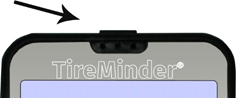
If the unit does not light up immediately, simply plug it into a live 12 volt power outlet using the cigarette lighter adapter or the USB cable to any USB port. You may work with the unit while it is charging or after 15 to 20 minutes it will have sufficient power to do a complete installation without it being plugged in.

Minder Division of Valterra Products
3000 SE Waaler Street
Stuart, FL 34997
Was this article helpful?
That’s Great!
Thank you for your feedback
Sorry! We couldn't be helpful
Thank you for your feedback
Feedback sent
We appreciate your effort and will try to fix the article